
If you want to know how to rank number one on Bing, this is the exact AI-assisted workflow I am using to rebuild search traffic after Google's Helpful Content Update.
My Blogging Story
I've been blogging for more than ten years across oneSmartCrib, UniversalRemoteReviews, LiveDontDiet, this site, and a few that didn't make it (RIP, KayakCraze).
In the early 2020s, after a five-year labor of love, I was clearing over $10,000 a month across those blogs. Roughly half came from Ezoic ad revenue, and roughly half came from the Amazon Associates program. Ezoic told me at the time that put me in the top 5% of bloggers in the world.
The playbook was simple. Rank low-competition keywords on Google, and supplement with Pinterest. Nearly all my traffic came from Google. I never gave Bing a second thought.
Then September 2023 happened. Google's Helpful Content Update obliterated small publishers in favor of forums, big partners, video carousels, and ads. Within months, $10,000 became $2,000, then functionally zero. I lost my day job the year after.
I Just Couldn't Throw in the Towel
I had already launched my @TecTimmy YouTube channel. But unlike most bloggers who jumped ship after the Helpful Content Update, I just couldn't do it. I had invested hundreds, if not thousands, of hours across around 600 articles spread out over five different blogs. So I asked a different question: what if I could figure out how to rank number one on Bing instead?
I'm not chasing the $10,000 heyday again. I'm looking to grow my blogs back to a point where they bring in $3,000 a month consistently. I'm up to around $1,500 a month now between Amazon Associates and Ezoic, and I'm still working through the cleanup. The goal is to get the blogs back to $3,000 a month alongside my other income streams, including the YouTube channel, a print-on-demand business, and a handful of other ventures.
What's Different About Ranking on Bing
Before you start working on how to rank number one on Bing, a few honest things to know:
- Bing traffic is small relative to Google. That changes the math. Going after a $30 universal remote at four percent commission means you need a wall of sales. Going after a $2,000 home theater speaker means one or two sales a week moves the needle.
- The special sauce is RankIQ plus AI. RankIQ grades my drafts and surfaces 30 to 50 LSI keywords per post. Claude is my daily writer, ChatGPT is my reliable backup, OpenAI Codex handles HTML and technical SEO, Wispr Flow does voice-to-text dictation, and Rank Math validates the on-page work inside WordPress.
- There is no magic button. Microsoft publishes enough about how Bing ranks pages to build a real playbook. The AI tooling has gotten good enough to execute it without burning weekends.
What Bing Actually Ranks
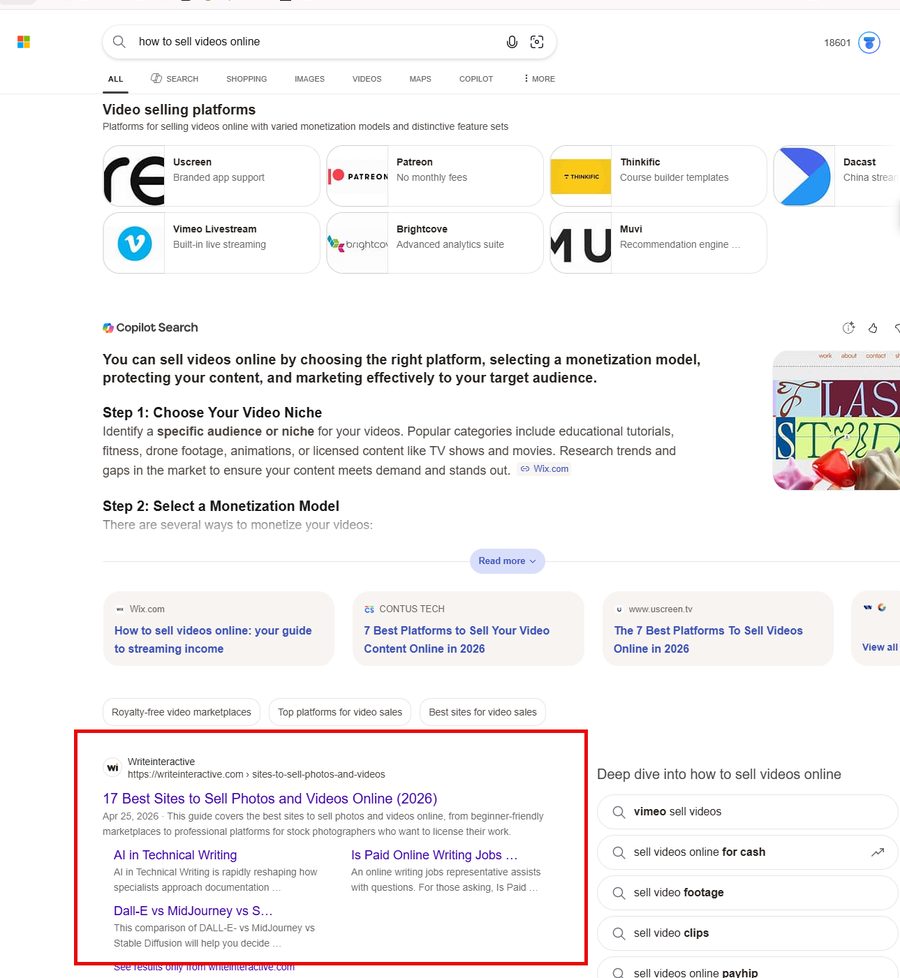
Knowing how to rank number one on Bing starts with knowing what Bing actually rewards. Microsoft is unusually transparent. From its search results documentation:
| Signal | What it means |
|---|---|
| Relevance | Does the page match the query's intent, not just the words? |
| Quality and credibility | Clear purpose, useful content, real author, trust signals. |
| User engagement | Clicks, dwell time, and whether users re-search after visiting. |
| Freshness | Stale content loses on time-sensitive topics. |
| Location and language | Geography and language affect what users see. |
| Page speed | Slow pages get punished. |
Microsoft also confirms that paid ads do not lift organic rankings. Ads and SEO are separate lanes. That list shapes the whole workflow below.
My Two-Pronged Strategy for How to Rank Number One on Bing
I work on Bing two ways at once.
- Refresh old posts that I let rot after the Google collapse. They already have age, internal links, and original screenshots. Updating them is the highest-ROI work I do.
- Create new posts that are genuinely more helpful than anything else out there. Higher-ticket affiliate products are nice if they fit, but the play is the most helpful answer on the internet, not the best commission.
Everything below applies to both prongs.
Solve Site Speed First
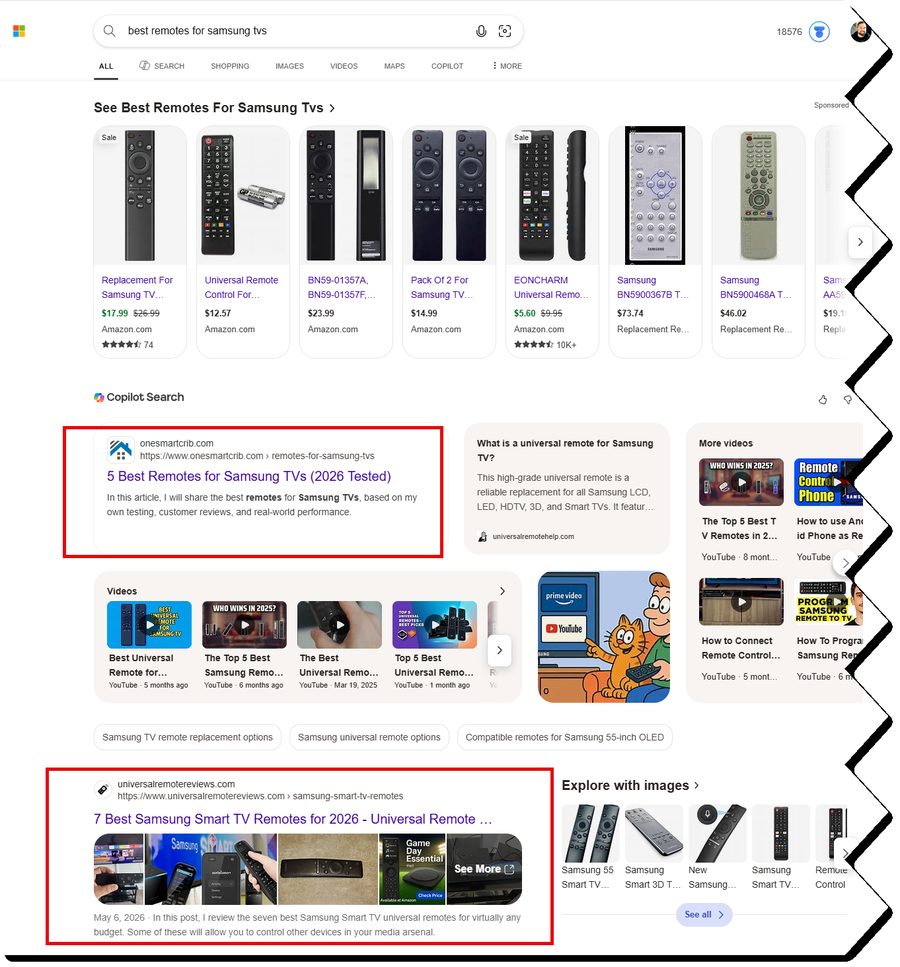
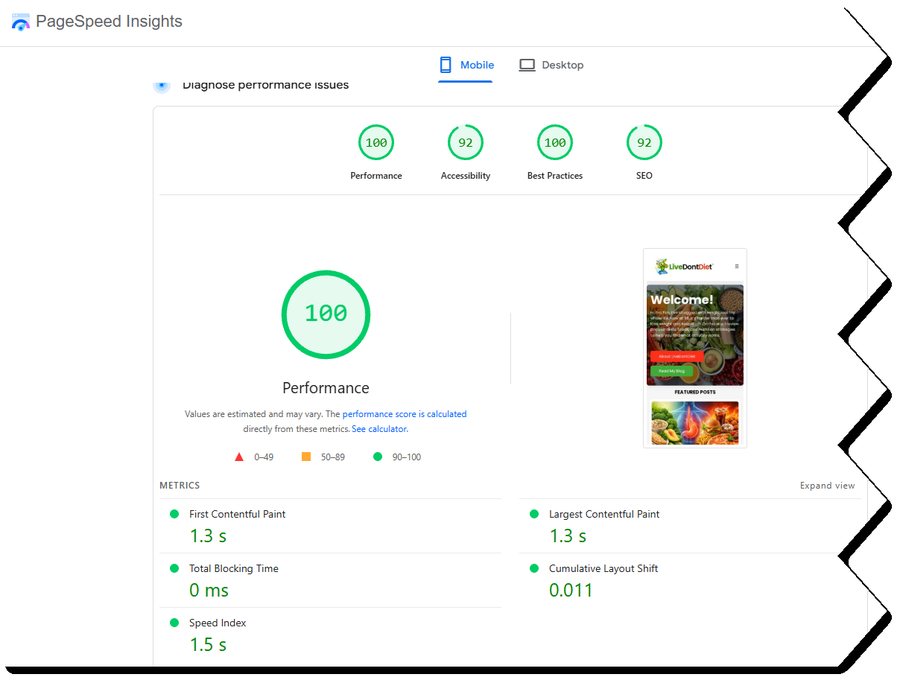
Before any other step in how to rank number one on Bing, you have to fix site speed. Slow pages sink every other ranking signal. Bing publishes page speed as a direct factor. Google buries you on it. Readers bounce in seconds.
Three moves that actually fixed it for me:
- Pulled Ezoic off my tech blogs. That one was painful because Ezoic was real revenue, but the ad scripts were murdering my speed scores. I'm still not 100 percent sure it was the right call long term. At the time, it was the only call I had.
- Installed Airlift on top of my X theme. I've run X on the tech blogs for years. It's beautiful, and it's slow. Airlift was the difference between failing Core Web Vitals and passing them overnight.
- Moved hosting to Phil at Spiderweb.uk. WP Eagle Alex put me onto Phil. The performance and technical support are well beyond anything I'd seen at this price point. If you'd like an intro to Phil, let me know.
If your site is slow, fix this before you read another step.
Step 1: Pick Smart Keywords for How to Rank Number One on Bing
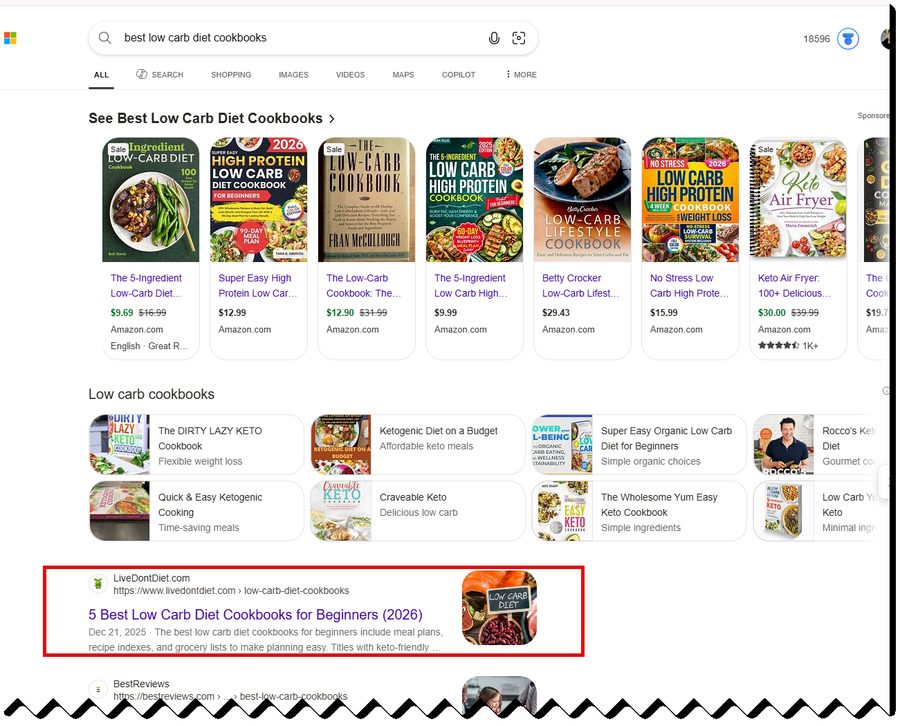
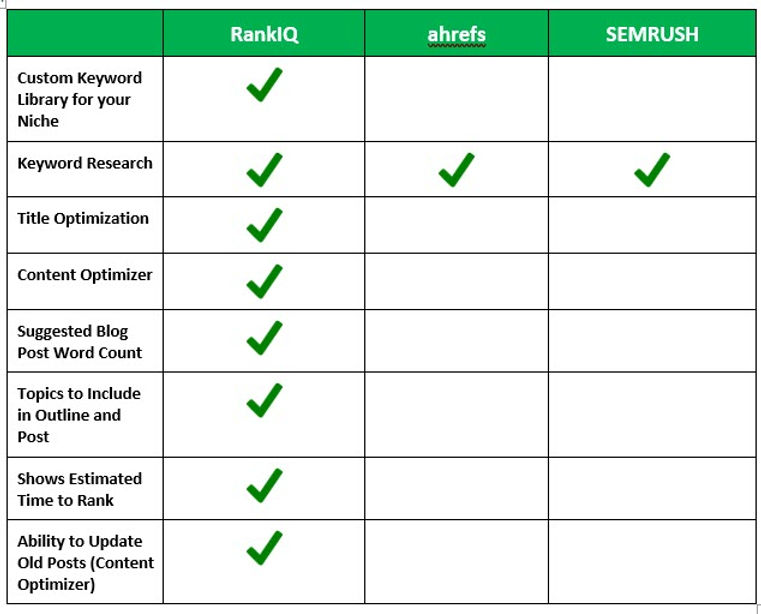
I used to pay for Ahrefs and SEMrush every month. In the current climate, common sense beats the dashboard. Open Bing, search the term, and look at what's actually ranking. The real SERP tells you more than any difficulty score.
If the top results are forum threads, outdated guides, or thin best-of pages, you have an opening. If they're Wirecutter, Wikipedia, and a national brand, pick a different fight.
A few rules I run by:
- Newer or low-authority sites, stay on long-tail. You aren't beating Wirecutter on "best universal remote." You might beat them on "best universal remote for Samsung Frame TV with Roku stick."
- Established sites running this workflow, you've got a real shot at moderately competitive terms. Just not head terms yet.
- Test, then adapt. If a post stalls at position 20 after three months, refresh, pivot, or kill it.
I do drop a candidate keyword into RankIQ as a sanity check. If the Content Grade target looks unreasonable, I catch it before wasting a draft.
Skyscraper Still Works
Brian Dean's Skyscraper Technique at Backlinko still captures the basic idea: find something already working, build a substantially better version, and make sure people can discover it. I don't use it as a spammy backlink outreach machine. I use the content side of it.
If someone is ranking with "31 Best Snacks for the Mediterranean Diet," build "55 Best Snacks" with the same intent, deeper coverage, and better visuals. That kind of post still moves the needle. Find a mid-tail query where the top result is beatable, then out-build it.
Step 2: Refresh Old Posts and Draft New Ones with AI to Rank Number One on Bing
Whether I'm refreshing a post that lost favor or building a new one from scratch, this step of how to rank number one on Bing looks the same. The goal is to get the AI to do the heavy lifting without losing my voice.
Most bloggers get this wrong because they let AI write in its own voice. The truth is that AI accelerates yours, but only when you guide it carefully.
My stack:
| Tier | Tool | Role |
|---|---|---|
| 1 | Claude (I call mine Jarvis) | Best long-form writer in the stack. Drafting, restructuring, voice. |
| 2 | ChatGPT | Reliable fallback. Strong all-rounder. |
| 3 | OpenAI Codex | Technical SEO, HTML cleanup, and programmatic SVG infographics (still in alpha, but real potential). I don't use Codex for general images. |
| Imagery | ChatGPT Image Gen 2 | Blog post heroes, intro images, body images, and infographics. Genuinely fast and good. |
| Input | Wispr Flow | Voice-to-text dictation. The reason this article exists in a single afternoon. |
The rankings shift month to month. I re-evaluate after every major version.
Guide the Drafting Loop
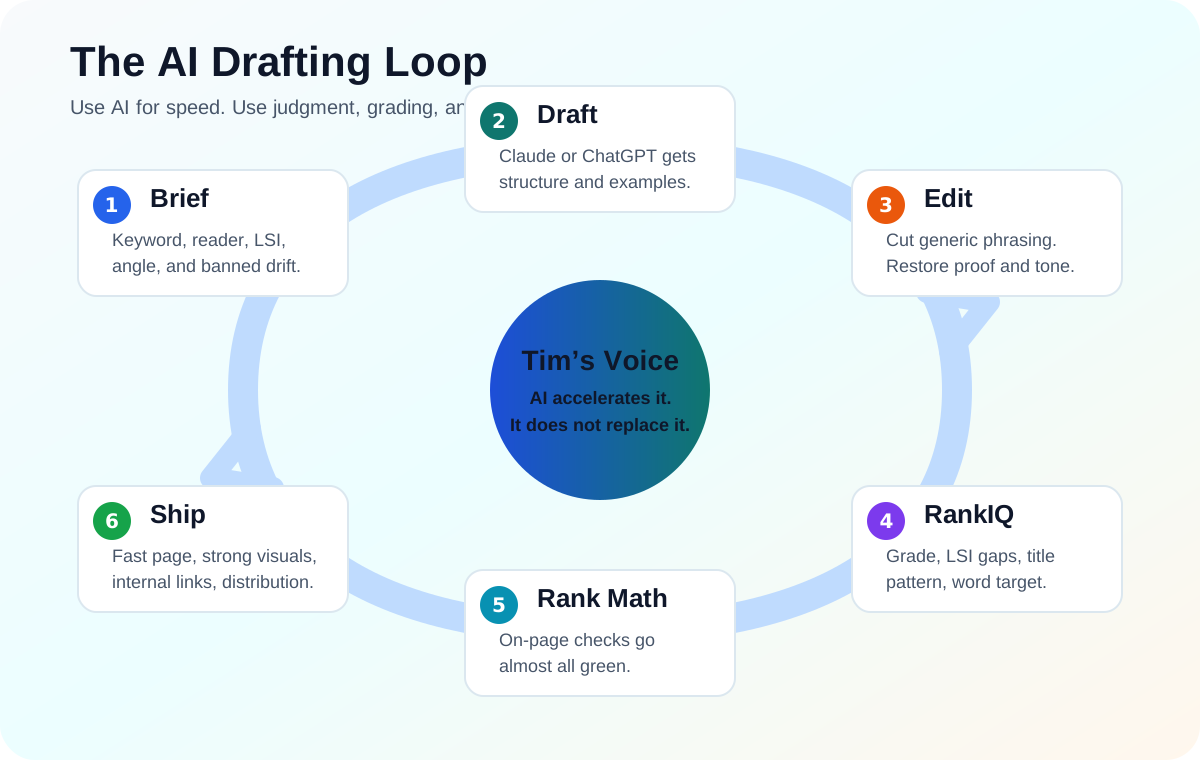
The fastest way to waste an afternoon is letting AI improvise. My fix is bracketing every draft with a tight workflow: give it a real brief, make it draft inside my voice, edit the generic stuff out, grade the article, then validate the on-page mechanics before anything ships.
That workflow is less about one magic prompt and more about keeping the model inside a controlled loop. AI gets you speed. RankIQ, Rank Math, and human judgment keep the piece from turning into generic mush.
Grade with RankIQ (The Special Sauce)
This is the step almost no one is doing, and it's why my Bing pages now climb when they used to stall.
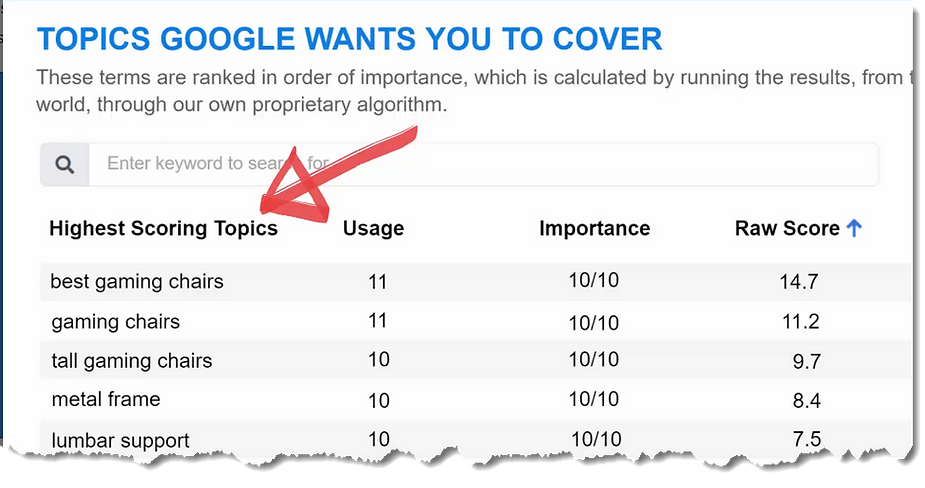
RankIQ is built to grade content against the SERP it's targeting. You paste your draft in. RankIQ scores it, flags missing LSI keywords (the 30 to 50 ancillary terms the algorithm expects when the topic is real), and tells you exactly where your draft is thin compared to the current top 10.
What I check in RankIQ before I touch Rank Math:
- Content Grade. Push it as high as the SERP will allow without keyword-stuffing.
- Missing LSI terms. Sprinkle them in naturally. Skip nothing.
- Title patterns. RankIQ shows which title structures the algorithms are rewarding for your query. I almost always change my working title after this step.
- Word-count target. RankIQ knows what length the SERP expects. Don't blow past it for the sake of length.
LSI keywords matter more than most bloggers realize. Write about the Mediterranean diet without mentioning olives, feta, salmon, chickpeas, olive oil, or lentils, and you'll struggle to rank no matter how good the prose is. RankIQ does the hard work for you. You could guess, but you'd guess wrong.
This is the single step that changed my Bing trajectory. If you only adopt one new tool from this post, make it RankIQ.
💸 Reader exclusive: RankIQ discount Brandon at RankIQ is offering my readers a discount when you sign up through my link. RankIQ is the single most impactful tool in my Bing stack. If any tool from this post is worth paying for, this is it. → Grab RankIQ with my reader discount
Validate with Rank Math
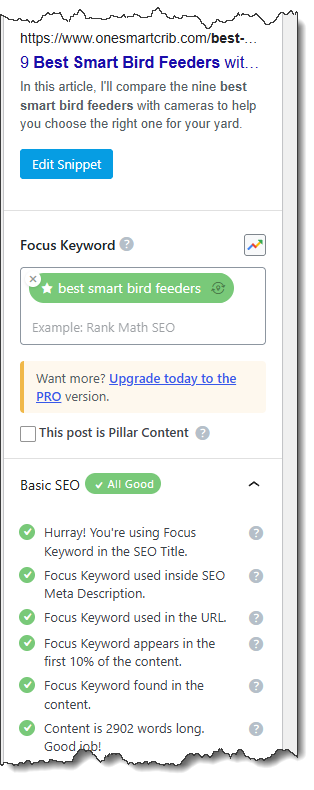
After RankIQ scores the content, Rank Math inside WordPress validates the on-page mechanics. The goal isn't to chase every green light. Push until almost every indicator is light green, then stop. Past that point, you're writing for the plugin instead of the reader, and Bing notices.
What Rank Math actually checks:
- Focus keyword in title, meta description, H1, URL, and content
- Keyword density (target around one percent; don't push past)
- Subheading coverage (keyword variants in H2 and H3)
- Internal and external link counts
- Image alt text
- Content length compared to competitors
Drop your RankIQ LSI list into the post naturally, and Rank Math's content score tends to climb on its own.
Step 5: Make It Scannable and Visual
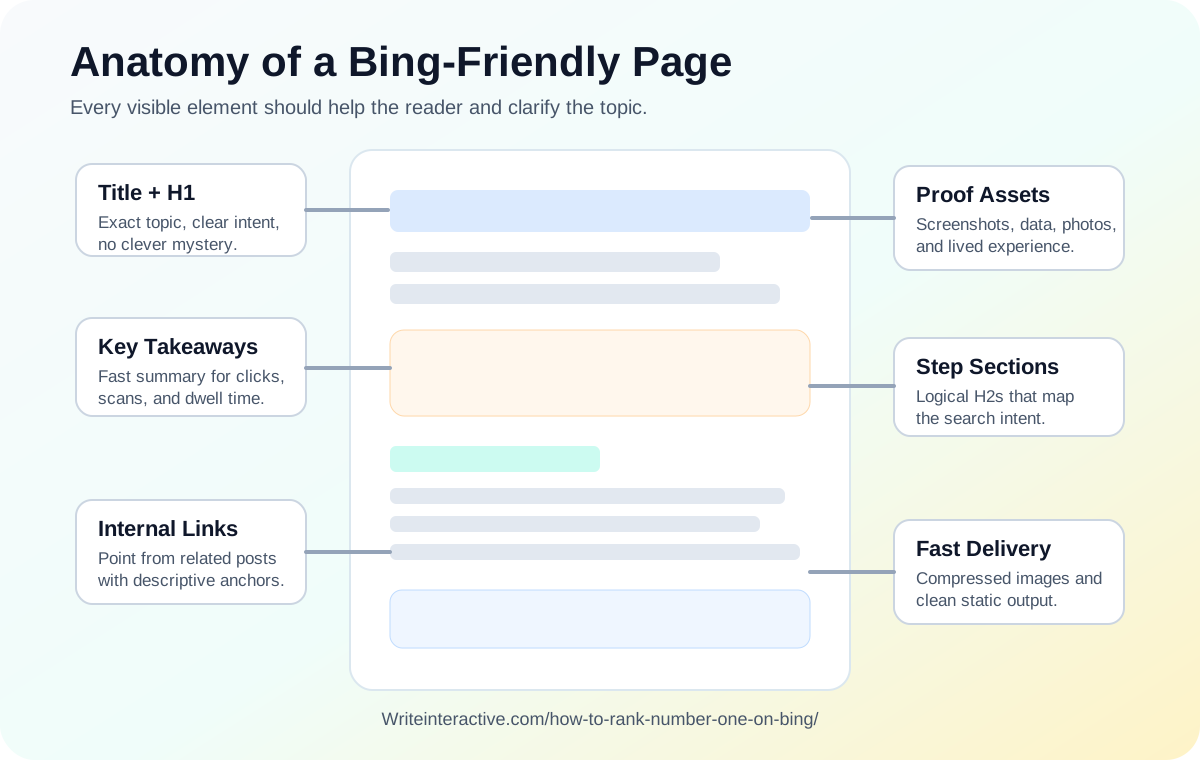
Scannability is a quiet pillar of how to rank number one on Bing. AI loves long paragraphs. Readers don't. Walls of AI text kill dwell time, and dwell time is one of Bing's six published signals.
Every section should break the wall with at least one of these:
- A numbered step
- A bulleted list
- A short table
- An image, screenshot, or diagram
- A pull-quote or callout
- A short video embed
Use ChatGPT Image Gen 2 for Everything Visual
This is the single biggest unlock of the last year. ChatGPT Image Gen 2 generates blog post hero images, intro images, body diagrams, and shareable infographics in under a minute. There's no excuse for a post today to ship without a hero and at least one infographic.

Two rules:
- Make it helpful. The image should communicate the post's core insight at a glance.
- Make it shareable. Use a vertical aspect ratio (1,000 by 1,500 pixels for Pinterest), your branding, and an article URL footer.
For programmatic SVG infographics (like a checklist version of a step-by-step post), Codex is decent and improving. But Image Gen 2 is the daily driver.
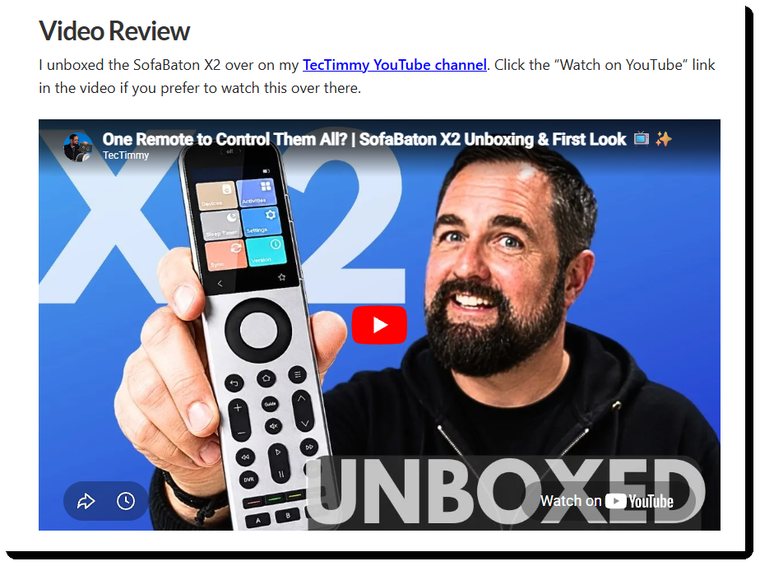
Embed Video, Yours First
In order of value:
- Your own video on the topic. This brings originality, your face, and your domain authority.
- A relevant third-party video. This still adds dwell time and topical depth.
- No video at all is a missed opportunity on any post worth ranking.
Affiliate Posts: Show Personal Product Ownership
If the article recommends a product through an affiliate link, show that you've actually used it.
- Your own screenshots of the product dashboard or interface
- A photo of the product in your real environment
- Better: a short clip of you using it
Readers and Bing's quality signal can tell the difference between a referral page and someone who owns the thing.
Step 6: How to Rank Number One on Bing Without Backlinks or an Agency
I've never subscribed to the whole backlink thing. It's one of the spammiest tactics on the internet, full of fake guest posts, link-building agencies in your inbox, and "$89 DR60 backlink" subscription services. Don't pay for any of it.
If your post is the most helpful answer to the query, links come naturally. That's been true in my experience for ten years running.
What I actually do:
- Build internal links from already-indexed pages on my own sites.
- Use descriptive anchor text. A real page title beats "click here."
- Let external links happen organically.
The same logic applies to SEO agencies. Use AI as your agency instead. Claude, ChatGPT, and tools like RankIQ guide you better today than most human consultants, and you keep the budget. AI is what's running the search engines now. You may as well think the way they do.
Step 7: Distribute Carefully Once You Know How to Rank Number One on Bing
Pinterest can drive real traffic to long-form SEO posts, provided it doesn't randomly ban your account. I had years of success with Pinterest across my blogs, even using Tailwind for auto-pinning. At one point, oneSmartCrib was getting thousands of visits a day from Pinterest alone.
Then Pinterest banned the account. The same thing happened with LiveDontDiet. I'd been careful: my own content, my own boards, low frequency. None of it mattered.
The rule is simple. Leverage Pinterest if you can, but treat it as a lever, not a foundation. Diversify across Bing, Pinterest, YouTube, email, and hosting commissions. The bloggers who survived the Google collapse mostly had more than one lane.
General SEO Rules That Still Apply to How to Rank Number One on Bing
The workflow above is what's specific to my approach. There's a baseline of generic SEO that hasn't really changed in years. None of this is new, but skipping it will sink an otherwise good page:
- Submit a clean XML sitemap. Use canonical URLs only. No drafts, no noindex pages.
- Set up Bing Webmaster Tools and IndexNow. Submission helps discovery, and IndexNow shortens it from days to minutes. Submission isn't ranking. It just makes ranking possible.
- Match search intent. A search for "how to rank number one on Bing" wants a checklist, not an essay. Answer the question in the first 200 words.
- Lock the on-page basics. One H1. The exact target phrase near the front of the title tag. A meta description written for clicks. A short, evergreen URL slug. Alt text on every image. Descriptive internal anchors.
- Watch the right metrics in Bing Webmaster Tools. Indexed status, impressions, search keywords, average position, CTR, and crawl errors. Read trends, not day-one positions.
- Schedule refreshes. Bing tracks freshness. Tools change interfaces. Don't let pages rot.
That's the generic baseline. The rest of this article is the part of the workflow that's actually mine.
The Full Toolkit I Use for How to Rank Number One on Bing
A heads-up before you scan the list. This site (Writeinteractive) is not on WordPress, and I'm exploring a future migration because the WordPress SEO plugin ecosystem is so deep. For now, WordPress remains a necessary evil for my tech blogs and the diet blog. Slow to load, plugin-bloated, but unmatched for the volume of SEO tools available.
| Tool / platform | What it does | What I pay | Minimum to get started |
|---|---|---|---|
| Self-hosted WordPress | The CMS running my tech and diet blogs. Heavy, but the SEO plugin ecosystem is unmatched. | Free software, paid hosting | Free software |
| RankIQ | Grades the post, surfaces 30 to 50 LSI keywords, validates structure and title. | Discounted via reader link | Cheapest tier via my link |
| Claude | My daily long-form writer. Drafting, restructuring, voice. | $200/mo (Max) | Free tier, or $20/mo (Plus) |
| ChatGPT | Reliable fallback. Image Gen 2 handles all post imagery. | $200/mo (Pro) | Free tier, or $20/mo (Plus) |
| Wispr Flow | Voice-to-text dictation. Massive first-draft speedup. | ~$12/mo | Same single tier |
| Rank Math | WordPress on-page grader. Push to almost-all-green, then stop. | $50/mo (Pro) | Free tier covers most checks |
| Airlift | The speed plugin that rescued my bloated X theme. | ~$12/mo | Same single tier |
| Spiderweb.uk | Phil's hosting. The price-to-performance king. | ~$150/mo across 5 blogs | ~$30/mo for a single blog |
| Bing Webmaster Tools | Sitemap, URL inspection, keyword data, indexing monitoring. | Free | Free |
| IndexNow | Push new and updated URLs to Bing instantly. | Free | Free |
5 Mistakes That Kill How to Rank Number One on Bing
These are the failures I see most often, including ones I've made myself.
1. Skipping site speed. Trying to rank a slow page is like trying to win a race on a flat tire. No on-page tactic, no AI tool, and no infographic recovers from broken Core Web Vitals.
2. Letting AI write in its own voice. Without pre-flight and post-flight checklists, you publish a generic AI dump. Your voice is the moat. Every paragraph should sound like you, not like Claude or ChatGPT.
3. Drafting without grading. Skipping RankIQ and Rank Math means shipping blind. Both exist to tell you what's missing before Bing does. The 30 to 50 LSI keywords RankIQ surfaces aren't optional.
4. Paying for backlinks or an SEO agency. Both are usually wasted money now. Earn links by being the best answer, and use AI as your agency.
5. Treating any one platform as a foundation. Single-channel businesses that depend on Bing, Pinterest, or YouTube are one algorithm change from heartbreak. Diversify, or you'll eventually regret it.
Can You Actually Hit #1 on Bing?
Yes, you can figure out how to rank number one on Bing — when your page is the best match for the query and the most helpful resource on the SERP.
The cleanest path is the workflow above, in order: fix site speed, pick a smart keyword, refresh or draft with AI, grade with RankIQ, grade with Rank Math, make it scannable and visual, skip the backlink hustle, and distribute carefully.
It's not flashy, but it's how durable Bing traffic actually gets built.
The Complete How to Rank Number One on Bing Checklist
This is the full set of checks across the workflow. Save it, screenshot it, or use it as the source for a custom infographic in ChatGPT Image Gen 2. The version I generated for this post lives at the bottom of this section.
Site Speed
- [ ] Strip heavy ad scripts if they're killing speed scores
- [ ] Install a speed plugin (Airlift for bloated themes)
- [ ] Host on a performance-focused provider (Spiderweb.uk works)
- [ ] Core Web Vitals all passing before anything ships
Step 1: Keywords
- [ ] Search the target term in Bing and eyeball the real SERP
- [ ] Newer site, long-tail only
- [ ] Established site, mid-tail competitive
- [ ] Sanity check the pick in RankIQ if you have it
- [ ] Skyscraper a beatable top result whenever you can
Step 2: Refresh or Draft with AI
- [ ] Pre-flight checklist: reference articles, LSI list, structure, banned phrases
- [ ] Draft with Claude or ChatGPT, guiding every paragraph
- [ ] Post-flight checklist: LSI coverage, voice match, drift check
- [ ] Run an after-action review if drift happens
Step 3: Grade with RankIQ
- [ ] Push Content Grade to target
- [ ] Weave in every flagged LSI keyword
- [ ] Update the title to match a winning pattern
- [ ] Hit RankIQ's recommended word-count target
Step 4: Grade with Rank Math
- [ ] Focus keyword in title, meta, H1, URL, and content
- [ ] Density around one percent (not over)
- [ ] Keyword variants present in H2 and H3
- [ ] Alt text on every image
- [ ] Almost-all-green before publish
Step 5: Scannable and Visual
- [ ] Hero image generated (ChatGPT Image Gen 2)
- [ ] At least one infographic embedded
- [ ] Tables, bulleted lists, and numbered lists throughout
- [ ] One video embedded, yours if possible
- [ ] Proof-of-ownership shots for any affiliate product
Step 6: Links
- [ ] Internal links from existing posts pointing in
- [ ] Descriptive anchor text (no "click here")
- [ ] No paid backlinks, no SEO agency
Step 7: Distribute
- [ ] Canonical URL submitted via Bing Webmaster Tools
- [ ] Update pushed through IndexNow
- [ ] Pinned to Pinterest (low frequency, your own boards)
- [ ] Refresh date scheduled
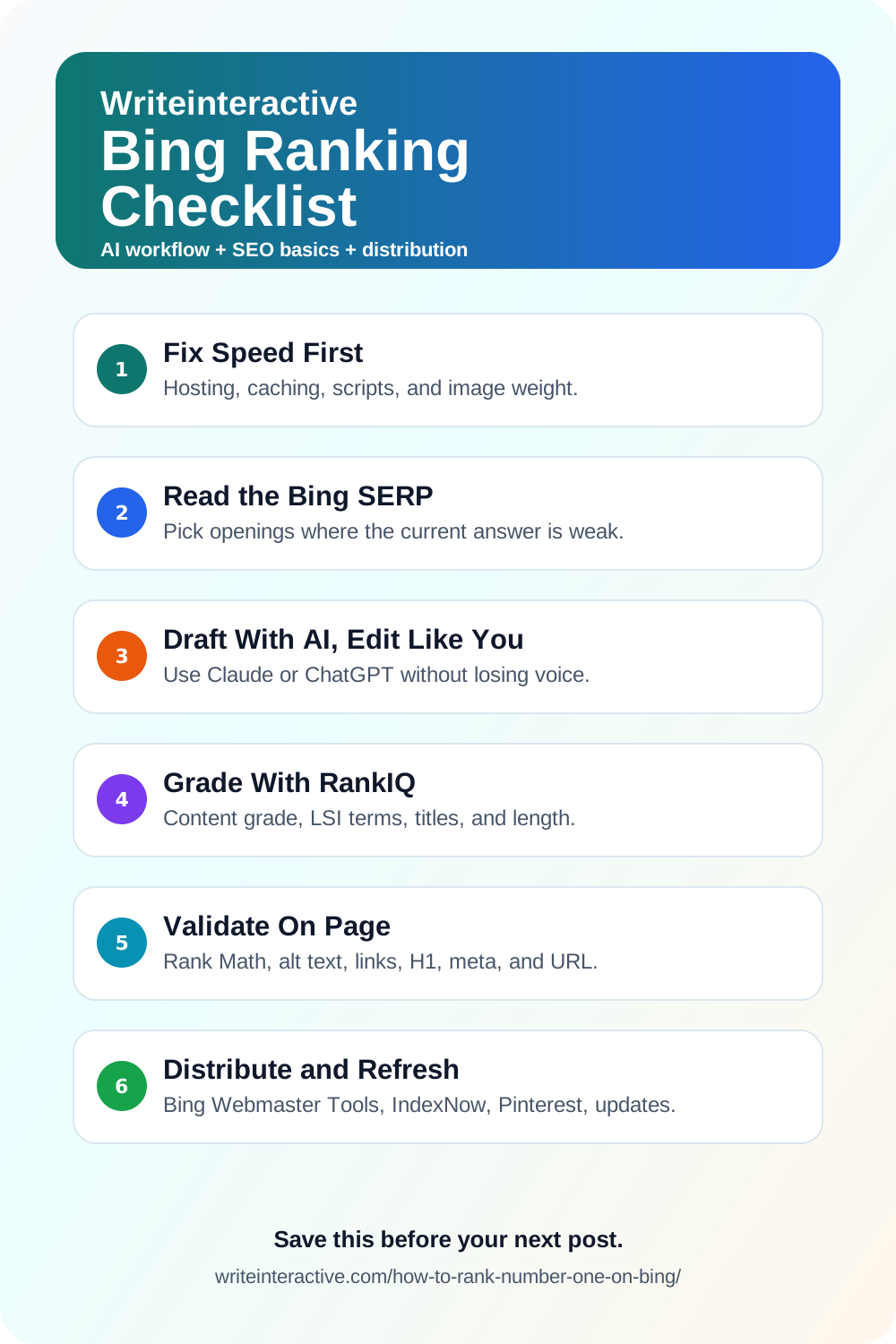
Save this checklist on Pinterest
Want help building durable search traffic? Start a project.
Want help with this kind of work?
We turn ideas like the one in this post into production-ready content, creative, and infrastructure.
Start a project →